By SourceLab AI Studios — May 2026
The best AI training for non-developers in 2026 is a structured, agent-paced or facilitator-paced program that pairs short sessions with concrete deliverables — workflows you keep using in your actual job, not certificates. Look for 8-12 sessions of 60-90 minutes each, focused on workflow integration over theory, with a free first session you can evaluate before committing.
The “best” question is harder than it looks because the AI training market in 2026 includes dozens of programs that all sound similar in marketing but differ a lot in substance. Here’s the honest filter for working professionals who don’t want to become developers.
What “best” actually means for non-developers
For non-technical working professionals, “best” doesn’t mean “most comprehensive curriculum” or “longest program” or “highest-credential instructor.” It means produces practical fluency in your actual job, fast, without requiring you to learn things you don’t need.
The criteria that matter:
- You can apply what you learn at work the same week
- You finish the program (a program you don’t finish isn’t worth its price, no matter how good the curriculum)
- The deliverables travel with you across tools and jobs
- The cost matches the outcome — paying $5,000 for tool literacy is bad ROI
The criteria that don’t matter as much as marketing suggests:
- Whether the curriculum covers machine learning theory
- Whether the instructor has a PhD or worked at a famous lab
- Whether you get a printable certificate
- Whether the platform has 100+ courses (more breadth often means less depth)
The non-negotiable features
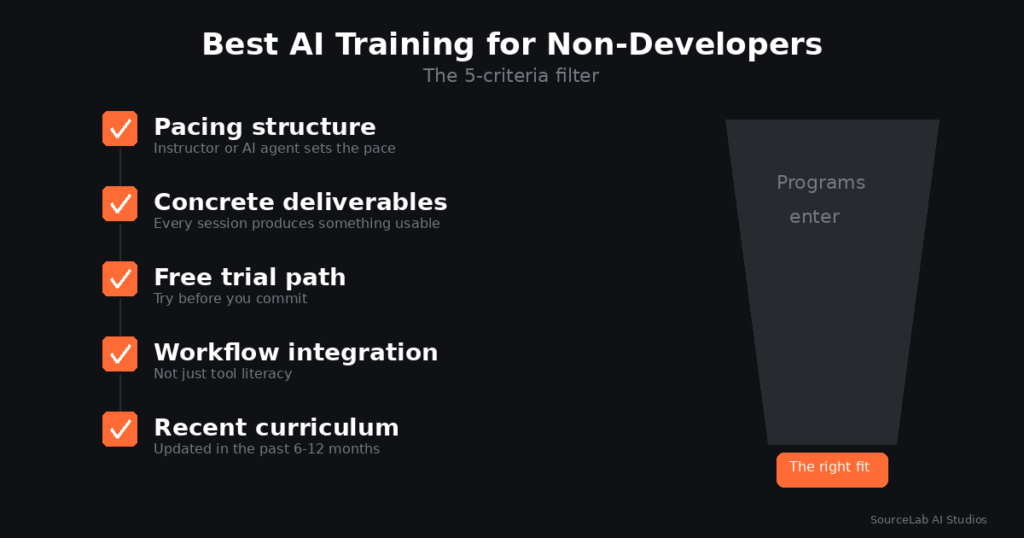
Every AI training program worth recommending for non-developers in 2026 has all five of these:
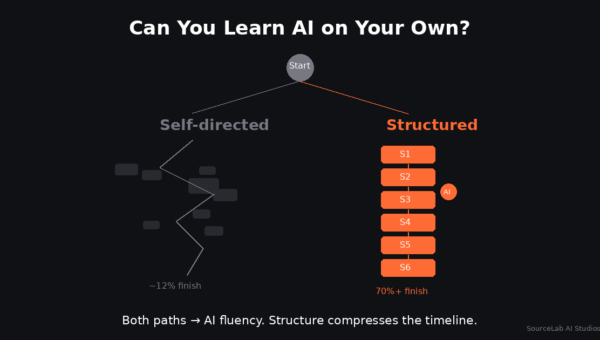
- Pacing structure (instructor or agent). Either a human facilitator or an AI instructor agent sets the pace within each session and keeps participants on track. This is the variable that distinguishes programs with 70%+ completion from ones with 12% completion.
- Concrete deliverables every session. Each session ends with something the participant takes home and continues to use — a Custom GPT, a prompt library, an automation, a worked example tied to their actual job. If a session ends with “now you understand how prompts work,” that’s not enough.
- A free trial path. Sessions 1 or 1-2 free, no credit card. Programs that require payment before letting you see the format are betting against their own quality.
- Workflow integration focus, not tool literacy alone. Tool literacy (“here’s what ChatGPT can do”) is a useful first session. The remaining sessions should move to workflow integration (“here’s how to use this for the report you write every Monday”). Programs that stay at tool literacy for 8 sessions are recycling the same lesson.
- Recent curriculum. The program should have visible signs of being updated in the past 6-12 months. AI tools change fast; curriculum that hasn’t kept up will teach you patterns that no longer apply.
For a deeper version of these criteria, see our pillar guide on AI training in 2026.
What to avoid
Three patterns that consistently produce bad outcomes for non-developers:
- Open-format asynchronous courses with no instructor. The completion-rate research is brutal on this format (covered in our pillar guide). If there’s no one (or nothing) setting the pace, most people don’t finish, no matter how good the recorded content is.
- Hybrid bootcamp/AI training programs that don’t match your goal. Some programs blend bootcamp-style coding instruction with AI training-style workflow integration. That works for some learners but isn’t ideal if you specifically want non-technical AI fluency. Check the curriculum and pick based on your actual goal — write code (bootcamp territory) or use AI tools without coding (AI training territory). See our breakdown on AI training vs. AI bootcamps for the format distinction.
- Programs whose main pitch is the certificate. Certificates without working AI integration in your job are decorative. Most employers don’t ask about AI certificates — they ask “how have you used AI in your work?”
Tool literacy vs. workflow integration: which do you need?
Most working professionals come into AI training thinking they need tool literacy (“teach me ChatGPT”) and discover they actually need workflow integration (“teach me to use this in my actual job”).
Tool literacy is a useful first session. It’s not a useful 8-session program. The first session covers it; sessions 2-8 should be doing the real work of integrating AI into your specific role.
A simple test: ask the program for a concrete example of a Session 4 deliverable. If they describe “we’ll explore advanced prompting techniques,” that’s still tool literacy. If they describe “you’ll build a multi-step workflow that handles your weekly status reports — research, draft, formatting, all in one chain,” that’s workflow integration. The second answer is what you want.
How to honestly compare programs
Side-by-side comparisons of specific programs go stale quickly because the AI training market changes fast. The more durable comparison method is the framework above. For any two programs you’re considering, ask the same five questions:
- Is there a pacing structure (instructor or agent)?
- Does each session produce a concrete deliverable?
- Is there a free trial path?
- Is the focus on workflow integration, not just tool literacy?
- Has the curriculum been updated in the past 6-12 months?
A program that gets five “yes” answers is in the running. A program that gets four or fewer probably isn’t, even if it has slick marketing.
SourceLab’s case
SourceLab’s AI Edge track is built specifically for non-developers — working professionals 28-55 in non-technical roles who want AI in their existing job without becoming engineers. 8 sessions of 90 minutes each, completed in 1-2 months. The AI instructor agent paces each session. Each session ends with a concrete deliverable tied to the participant’s actual work. Sessions 1 and 2 are free.
That’s our shape. Several similarly designed programs exist; the framework above works for evaluating any of them — including ours. For a deeper dive on whether AI training pays back, see our piece on is AI training worth it in 2026.
FAQ
What’s the cheapest good AI training for non-developers?
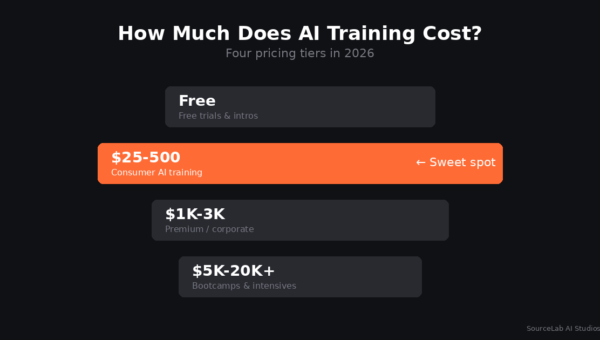
Many programs offer free first sessions, including SourceLab. Beyond the free trial, programs in the $25-50/session or $200-500/track range that meet the five criteria above are generally good value.
Do I need to know any technical concepts before starting?
No. The right AI training programs for non-developers assume zero technical background. If a program assumes coding or ML fundamentals, it’s designed for a different audience.
How long until I can use AI fluently at work?
Most participants in well-structured programs build a usable workflow in their first session and reach broader fluency around sessions 4-6. Architecture-level fluency lands around session 8-12.
Can I do AI training while working full-time?
Yes — in fact, the 8-12 session shape is specifically designed for working professionals. Sessions of 60-90 minutes once or twice a week are the most sustainable cadence.
Is there a single “best” program for everyone?
No. The right program depends on your specific role, learning preferences, schedule, and budget. The five-criteria framework filters out the bad ones and lets you choose among the good options based on fit.
See SourceLab in action
SourceLab’s AI Edge track is built for non-developers. Sessions 1 and 2 are free.
Start your first session free →
SourceLab AI Studios is a neighborhood AI learning center based in Mill Valley, CA. Our 8-session AI Edge track teaches working professionals to use AI tools effectively in their actual jobs. Learn more →. For the broader picture, see our pillar guide on AI training in 2026.