By SourceLab AI Studios — May 2026
The best online AI course for a beginner in 2026 depends on which kind of beginner you are. Three distinct profiles — total beginners, casual users, and curious skeptics — each need a slightly different starting point. The wrong start (a comprehensive 40-hour curriculum) overwhelms beginners and gets abandoned. The right start (a focused 60-90 minute first session tied to one real task) produces immediate confidence and a foundation that compounds. This guide skips the criteria framework (covered in our pillar guide and best AI training for non-developers post) and focuses on what a beginner should actually do in their first 30 days.
A common beginner mistake: picking an “AI fundamentals” course thinking it’s the prerequisite to using AI. It’s not. Most non-technical professionals don’t need to understand machine learning theory to be effective with AI tools. Start with use; understanding can come later if you want it.
Which kind of beginner are you?
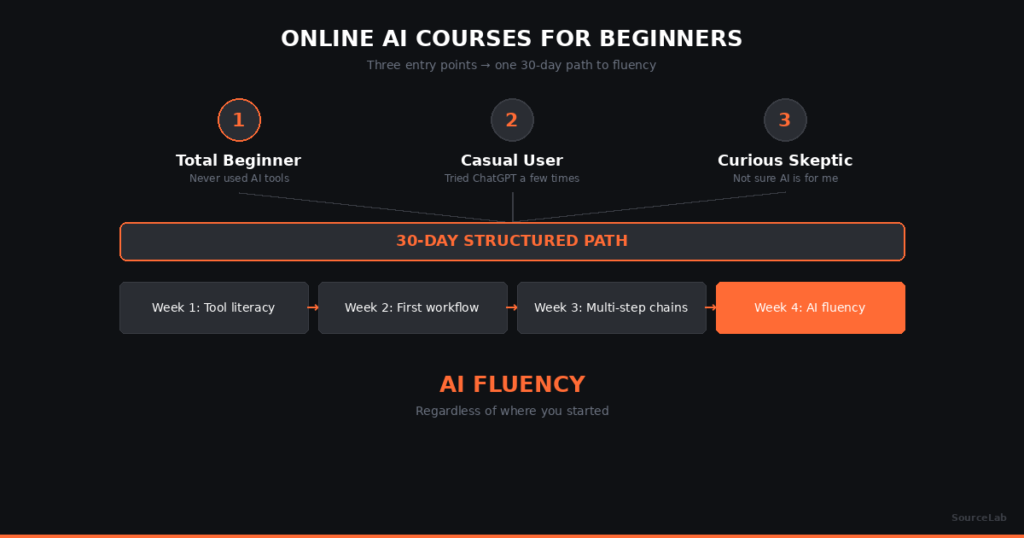
Three profiles, each with a different starting point:
Profile 1 — Total beginner. Never used ChatGPT, Claude, Copilot, or Gemini. Maybe seen demos, maybe nervous about trying. The right starting point: a free tool-literacy session or vendor-published getting-started guide (Anthropic, OpenAI, Google all publish them). 1-2 hours total. Goal: get past “what do I even type.”
Profile 2 — Casual user. Opened ChatGPT or Claude a few times for small tasks but doesn’t use it for work. The right starting point: skip tool literacy entirely. Take a structured first session tied to a real work task. SourceLab’s free Session 1 fits this profile.
Profile 3 — Curious skeptic. Read articles about AI, watched some demos, maybe avoided it on principle. The right starting point: same as casual user. The barrier is application, not knowledge.
Most people who think they’re “total beginners” are actually casual users — they’ve used AI without realizing it counts. Honest self-assessment matters more than picking the right course.
A 30-day beginner path that actually produces fluency
The same path works for all three profiles, with a small adjustment at the start. Total beginners spend the first week getting comfortable; casual users and curious skeptics skip to week 2.
Days 1-7: Get comfortable (total beginners only)
- 30-60 minutes total spent trying ChatGPT, Claude, Copilot, or Gemini on three small real tasks: writing an email, summarizing an article, drafting a meeting agenda.
- Goal: get past the “what do I even type” stage. No course needed — just play.
- After this week, you’re a casual user. Continue with the path below.
Days 8-14: Structured first session
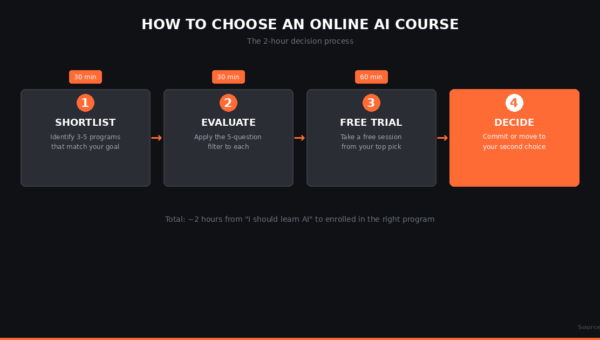
- Take the free first session of a structured AI program. Most reputable programs offer this.
- Bring one specific real work task — an email, meeting notes, a process doc.
- Goal: build one concrete workflow tied to your actual job. Walk out with something useful you keep using.
Days 15-25: Apply daily
- Use the workflow you built daily on real tasks at work.
- When something doesn’t work, iterate — adjust the prompt, change the structure, ask better questions.
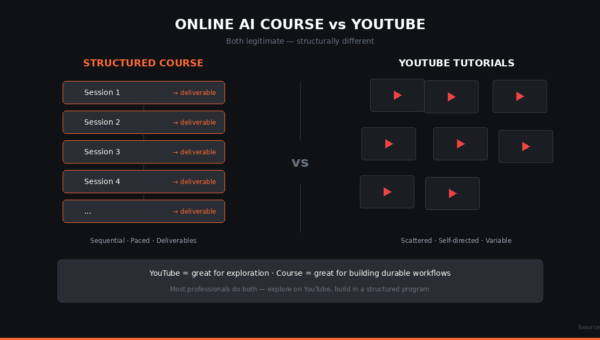
- This is where fluency forms. Tutorials don’t produce fluency; daily application does.
Days 26-30: Decide what’s next
- By day 30, you’ll know whether the structured format fits you. If yes, continue with the program. If no, switch to a different format (cohort-based, agent-paced, or self-directed with peer support).
- Pick the second workflow to build. Status reports, meeting prep, customer comms — whatever’s next-highest frequency.
Most working professionals who follow this 30-day path have practical AI fluency by day 30 and a workflow they keep using. Faster than most expect.
What to skip if you’re a beginner
Three patterns that overwhelm rather than help:
- Comprehensive 40+ hour AI fundamentals courses. Some are excellent courses — just not for beginners’ first stop. Save them for after you have a foundation.
- AI bootcamps marketed as “AI for beginners.” Some bootcamps repackage their ML curriculum as beginner-friendly. They aren’t, for non-technical people. See our breakdown on AI training vs. AI bootcamps.
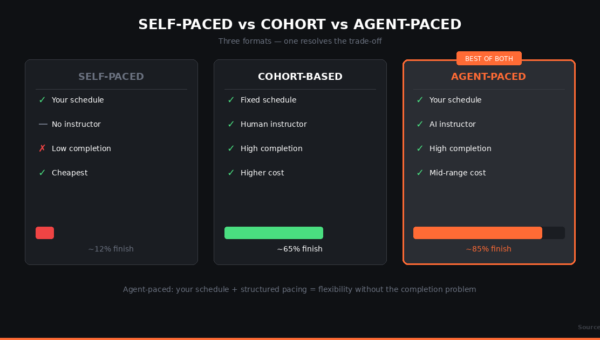
- Open-format async courses with no instructor. The completion-rate research shows median completion around 12.6% across studied async platforms (Open Praxis, 2024). Beginners drop off faster than experienced learners; you need pacing structure most.
SourceLab’s beginner path
SourceLab’s AI Edge track is built for non-technical working professionals — including total beginners. Session 1 (free, no credit card) has you bring one real work task and walk out with it done, using AI. The AI instructor agent paces you through it; no prior AI experience assumed. After Session 1 you decide whether to continue.
That’s our beginner shape. Other beginner-friendly options exist — Coursera’s “AI for Everyone” (DeepLearning.AI), Google’s free AI Essentials, Microsoft’s Copilot getting-started materials. Each works for slightly different audiences. For evaluation criteria across any beginner-friendly program, see best AI training for non-developers.
FAQ
Do I need to know how AI works before I can use it?
No. Plenty of effective AI users couldn’t explain how transformers work. Start with use; understanding can come later if you want it.
What’s the absolute best first AI course for a complete beginner?
The best first course is a free first session of a structured program tied to a specific real task. Less than 90 minutes, produces something concrete, no commitment. Most reputable AI training programs offer this.
What if I’m intimidated by technology in general?
Pick a course explicitly designed for non-technical adults. Look for plain-language framing and a small, concrete first deliverable. Avoid programs that lead with technical specs.
Should I pay for a beginner course or use free resources?
For absolute beginners, free first sessions of paid structured programs are usually the best starting point — same format as the paid version, no commitment, lets you see if it fits before paying. For ongoing learning, see best free AI courses.
How long until I’m not a beginner anymore?
By day 30 of structured practice on real tasks, most beginners cross into “casual user” territory. By month 2-3, “competent user.” Faster than most expect.
See SourceLab in action
SourceLab’s first two sessions are free. No credit card. Bring one task you actually do at work.
Start your first session free →
SourceLab AI Studios is a neighborhood AI learning center based in Mill Valley, CA. Learn more →. For the broader picture, see our pillar guide on online AI courses in 2026.